How to Withdraw Money from Dragon Tiger Club – Complete Step by Step Guide
A simple and complete guide showing how to withdraw your winnings from Dragon Tiger Club directly to your JazzCash or EasyPaisa wallet in Pakistan.
Withdrawing money from Dragon Tiger Club is a straightforward process. The app supports two withdrawal methods in Pakistan — JazzCash and EasyPaisa. Withdrawals are fully automatic and mostly complete within 15 to 30 minutes. No agent is needed and you can request a withdrawal directly from inside the app.
This guide covers everything you need to know — how to withdraw, which methods are available, withdrawal limits, and what to do if your withdrawal is delayed.
Withdrawal Methods Available
Dragon Tiger Club supports the following withdrawal methods for players in Pakistan.
| Payment Method | Minimum Withdrawal | Processing Time |
|---|---|---|
| JazzCash | Rs. 500 | 15 – 30 minutes |
| EasyPaisa | Rs. 500 | 15 – 30 minutes |
Before You Withdraw
Before making your first withdrawal, make sure the following are in place.
- You are logged into your Dragon Tiger Club account
- Your account balance meets the minimum withdrawal amount of Rs. 500
- Your JazzCash or EasyPaisa number is correctly linked inside the app
- Your registered mobile number matches your JazzCash or EasyPaisa wallet number
- You have a stable internet connection
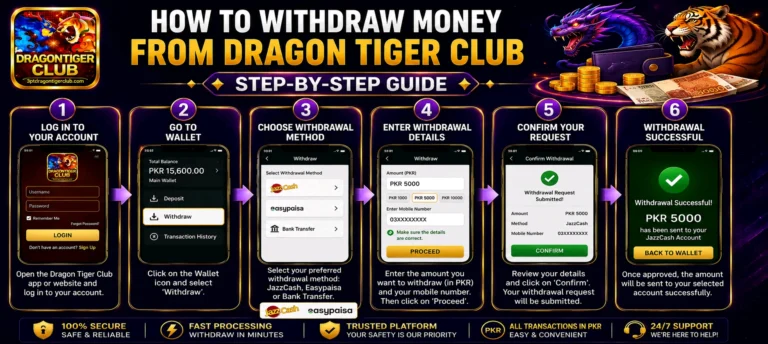
How to Withdraw Money from Dragon Tiger Club — Step by Step
Follow these steps to withdraw your winnings from Dragon Tiger Club.
- 1Open the Dragon Tiger Club App — Launch the app and make sure you are logged in to your account.
- 2Tap on Wallet — On the home screen, find and tap the Wallet icon or button.
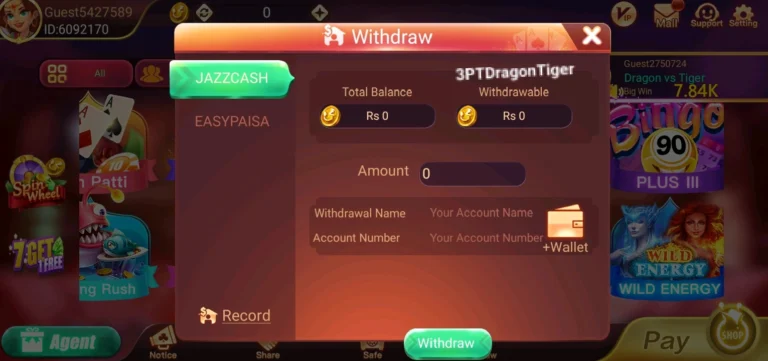
- 3Select Withdraw — Inside the wallet section tap on the Withdraw option.
- 4Choose Your Payment Method — Select either JazzCash or EasyPaisa as your withdrawal method.
- 5Enter Your Wallet Number — Type in the mobile number linked to your JazzCash or EasyPaisa account. Check it carefully before moving on.
- 6Enter the Withdrawal Amount — Type in the amount you want to withdraw. The minimum is Rs. 500.
- 7Confirm the Request — Review your details and tap Confirm to submit your withdrawal request.
- 8Wait for Payment — The money will arrive in your JazzCash or EasyPaisa wallet within 15 to 30 minutes.
Withdrawal Limits
Here are the withdrawal limits currently available in Dragon Tiger Club.
| Detail | Amount |
|---|---|
| Minimum Withdrawal | Rs. 500 |
| Maximum Withdrawal | Based on your account level |
| Processing Time | 15 to 30 minutes |
| Withdrawal Fee | No fee charged by Dragon Tiger Club |
How to Withdraw Using JazzCash
JazzCash is the most commonly used withdrawal method in Pakistan. Here is how to withdraw using JazzCash.
- 1Go to Wallet → Withdraw → JazzCash inside the app
- 2Enter your JazzCash mobile number and the amount to withdraw
- 3Tap Confirm to submit the request
- 4Money arrives in your JazzCash wallet within 15 to 30 minutes
How to Withdraw Using EasyPaisa
EasyPaisa works the same way as JazzCash for withdrawals. Here is how to withdraw using EasyPaisa.
- 1Go to Wallet → Withdraw → EasyPaisa inside the app
- 2Enter your EasyPaisa mobile number and the amount to withdraw
- 3Tap Confirm to submit the request
- 4Money arrives in your EasyPaisa wallet within 15 to 30 minutes
Common Withdrawal Problems and Solutions
If your withdrawal does not arrive or is delayed, check the solutions below.
Withdrawal Taking Too Long
Withdrawals mostly complete within 15 to 30 minutes. During peak hours it may take slightly longer. If your withdrawal has not arrived after 1 hour, contact Dragon Tiger Club support through the app with your withdrawal details.
Withdrawal Request Failed
Check that your wallet number is entered correctly and matches your registered JazzCash or EasyPaisa account. Also make sure your account balance meets the Rs. 500 minimum. Try submitting the request again after checking these details.
Wrong Wallet Number Entered
If you entered a wrong number and the withdrawal was processed, contact Dragon Tiger Club support immediately with a screenshot of the withdrawal confirmation. The support team will investigate and help resolve the issue.
Withdrawal Option Not Showing
Make sure your account balance is at least Rs. 500. If the balance is below the minimum the withdrawal option may not appear. Also check that your account is fully verified with a linked payment method.
Money Deducted but Not Received
If the balance was deducted from your Dragon Tiger Club wallet but the money did not arrive in your JazzCash or EasyPaisa account, take a screenshot of your withdrawal history inside the app and contact support immediately.
Frequently Asked Questions About Withdrawals
What is the minimum withdrawal amount in Dragon Tiger Club?
The minimum withdrawal amount is Rs. 500. You need at least Rs. 500 in your account to make a withdrawal request.
How long does a withdrawal take?
Withdrawals mostly complete within 15 to 30 minutes. During busy periods it can occasionally take up to 1 hour.
Is there any fee for withdrawing money?
Dragon Tiger Club does not charge any fee for withdrawals. However your JazzCash or EasyPaisa account may have its own transaction charges.
Can I withdraw to a different number than the one I registered with?
You can update your linked payment number inside the app settings. However make sure the new number is an active and verified JazzCash or EasyPaisa account before making a withdrawal.
How many times can I withdraw in a day?
There is no fixed limit on the number of withdrawals per day. However your JazzCash or EasyPaisa daily transaction limits may apply.
What should I do if my withdrawal is not received after 1 hour?
Contact Dragon Tiger Club customer support through the app. Share your withdrawal ID, amount, and the mobile number you withdrew to. The support team is available 24 hours a day and will check the status for you.
Conclusion
Withdrawing money from Dragon Tiger Club is a simple and fully automatic process. With JazzCash and EasyPaisa both supported, players in Pakistan can receive their winnings directly to their mobile wallet within 15 to 30 minutes.
Always make sure to enter the correct wallet number and keep your account balance above the Rs. 500 minimum before making a withdrawal request. If you ever face a problem, the support team is available inside the app 24 hours a day to help you.